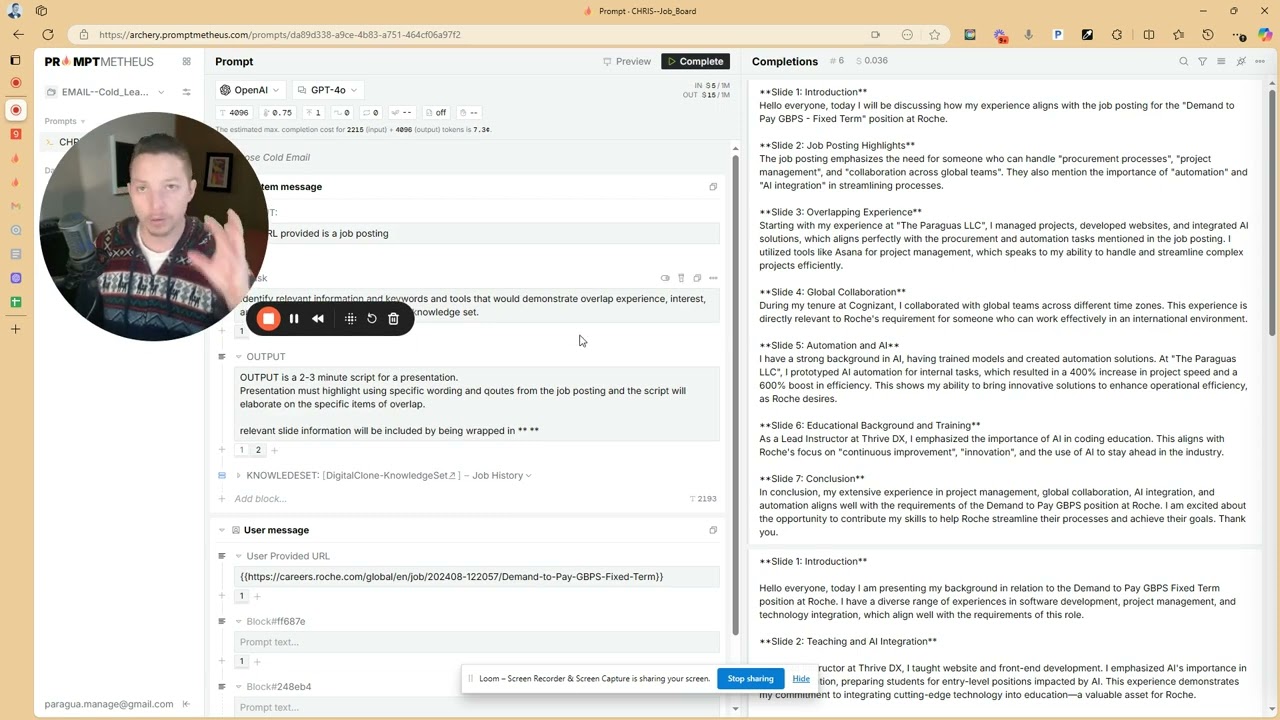
Short answer: Break your background into small, organized files (experience, education, volunteering) with real examples, and keep dated versions. Then build prompts, in reusable blocks, that tell AI exactly what to do with that knowledge. The knowledge set is half the job. The prompt is the other half.
Watch the original video.
When someone new looks at working with me, whether for a project or for services, the same questions come up. What tools do you use? What's your background? Tell me about a time you did XYZ. Those questions repeat over and over.
You can prepare for them, of course. But it helps to get the common qualification questions answered up front. So I started experimenting with what people call a digital clone: in practice, a structured knowledge base about me plus prompts that know how to use it.
Step 1: Start with what you already have
Your LinkedIn matters, and it already has the main sections: experience, education, volunteer work. Those are the pieces people use most.
So I went through each section and talked through everything I've done, in much more depth than a profile allows.
Step 2: Break it into useful files
Then I broke that information into separate files:
- Volunteering, expanded with specific examples.
- Job history, expanded with specific projects and examples.
- Education, and so on.
Those are the three main buckets. Small, focused files are easier to work with than one giant document.
Step 3: Keep versions
At the same time, I keep records with versions saved on different dates. As I update things, there's a history of how the information changed over time.
You could take that further and use GitHub as the source, with branching and everything.
Step 4: Build the prompt, separately
Here's the key point: creating a knowledge set is one thing. Building a prompt for how to use that knowledge set is another.
Prompting is much more of an art. It's creative, and it takes some troubleshooting to find the exact format that gets the best result.
That's why I've been using Promptmetheus. The documentation isn't the best (I may end up making tutorials myself), but the interface is much better for this kind of work:
- Variations of wording you can compare.
- Reordering pieces of the prompt.
- Blocks: breaking the prompt into separate chunks you control.
- Token counts, so you can see the cost of each version.
Step 5: Test, rate, adjust
Then I run it, give yays and nays to outputs I like or don't, and adjust the raw input. You can try it across different model options too.
One nice touch: I can export the whole prompt, with all the information, as a text file, then paste it straight into the browser. That saves tokens if that's a concern.
Where this goes
The result, slowly but surely, is a one-stop shop for reference material I'd otherwise have to recreate every time.
Then you connect it to other services, Google and other APIs, and it starts to work like a whole team. You stretch your productivity across multiple projects at once. That benefits an individual, and a business too.
The limits
- It's only as good as the input. Thin or outdated files give you thin output.
- It might be overkill. Depending on your business and how you use AI, a surface-level setup may be all you need.
- It takes some background. The people who'll get the most out of it have AI literacy, and coding experience helps, because you're used to breaking very large problems into smaller pieces and experimenting.
- I'm still learning. I was new to this when I recorded it, and still impressed with what it could do.
The takeaway
- Break your experience into small, focused files with real examples.
- Version them so updates don't erase history.
- Treat the prompt as its own project, built in blocks.
- Test, rate and refine.
There's an art to prompting, because the output is only as good as the input. If you want help building a knowledge base and prompt setup for your business, that's what codeChris is for.